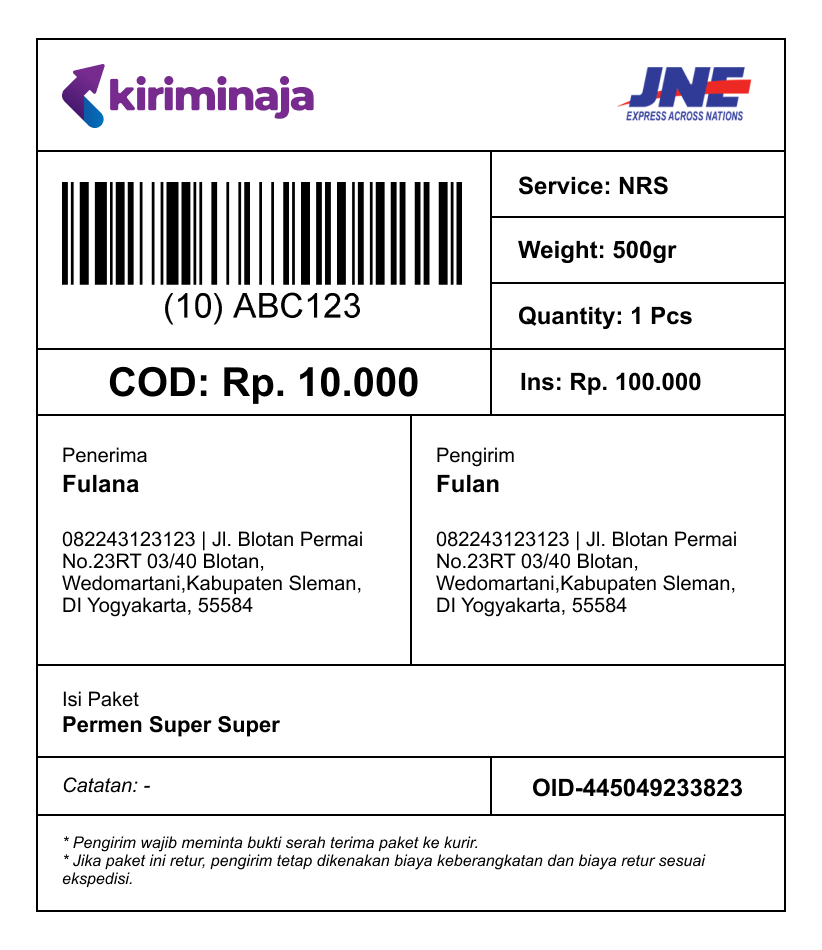
Shipment Label
Shipping label for each package to be sent through the courier service using the KiriminAja platform with required and optional information
Ensure that the shipping label is printed clearly and attached securely to the package. The label should be visible and not covered by any other materials.
Field Requirements
| No | Field | Required | Description |
|---|---|---|---|
| 1 | Logistic Logo / Label | Yes | Courier service logo (e.g., JNE, J&T, SiCepat) |
| 2 | Service Type / Service Label | Yes | Courier service type (e.g., REG, OKE, YES, SICEPAT HALU) |
| 3 | AWB Barcode | Yes | Your awb, should be printed via 128A format |
| 4 | AWB Label | Yes | AWB Label beside the awb barcode |
| 5 | Shipping Type | Yes | COD or Non-COD. If COD, should inform the COD Value |
| 6 | Sorting Code | Yes | Sorting code for the courier service |
| 7 | Sender & Recipient Details | Yes | Name, Phone Number, Complete Address, and Postal Code |
| 8 | Shipment Weight | Yes | Weight of the shipment in grams |
| 9 | Item Quantity | Yes | Total quantity of items in the shipment |
| 10 | Insurance Information | Yes (If Used) | Insurance information if you want to use insurance |
| 11 | Origin & Destination City | Yes | Origin and destination city of the shipment |
| 11 | Item Information | Yes | List, price, name. You can use table list if the content is extensive |
| 12 | Order Ref Label | Yes | Order ID / Order Number of your platform, that using KiriminAja Prefix |
Checklist
- Ensure all required fields are present and clearly visible on the shipping label.
- Verify that the AWB barcode is printed in 128A format.
- Confirm that the order reference barcode is printed in 128A format (if used).
- Double-check sender and recipient details for accuracy.
- Make sure the shipping label is securely attached to the package.
- Try to scan the AWB barcode and order reference barcode (if used) to ensure they are readable since the courier scanner device may vary.
Customization
You can customize the shipping label according to your needs, but make sure that all required fields are present and clearly visible. You can also add your own branding or design elements to the label, as long as they do not interfere with the required information.
Printing
When printing the shipping label, make sure to use a high-quality printer and paper to ensure that the label is clear and legible. Avoid using low-quality printers or paper that may cause the label to smudge or fade.
Special Note
Some couriers have special requirements for the shipping label. Please refer to the table below for more information:
| Courier | Special Note |
|---|---|
| JNE | For JNE Shipping Label, please add information of CASHLESS before the Shipping Type if your delivery type is Drop-Off, no matter is COD or Non-COD. This is to inform the courier that the payment has been made online and no cash will be collected during delivery. That will look like: |
| J&T Cargo | J&T Cargo require routing code to be printed on the shipping label. Please see our example here: J&T Cargo Shipping Label |
| SPX Express | SPX Require 2-column of sorting code to be printed on the shipping label. Please see our example here: SPX Express Shipping Label |
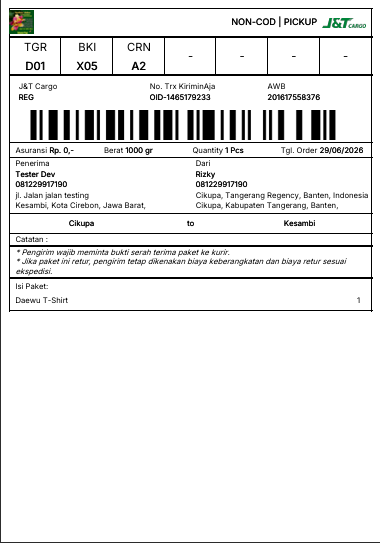
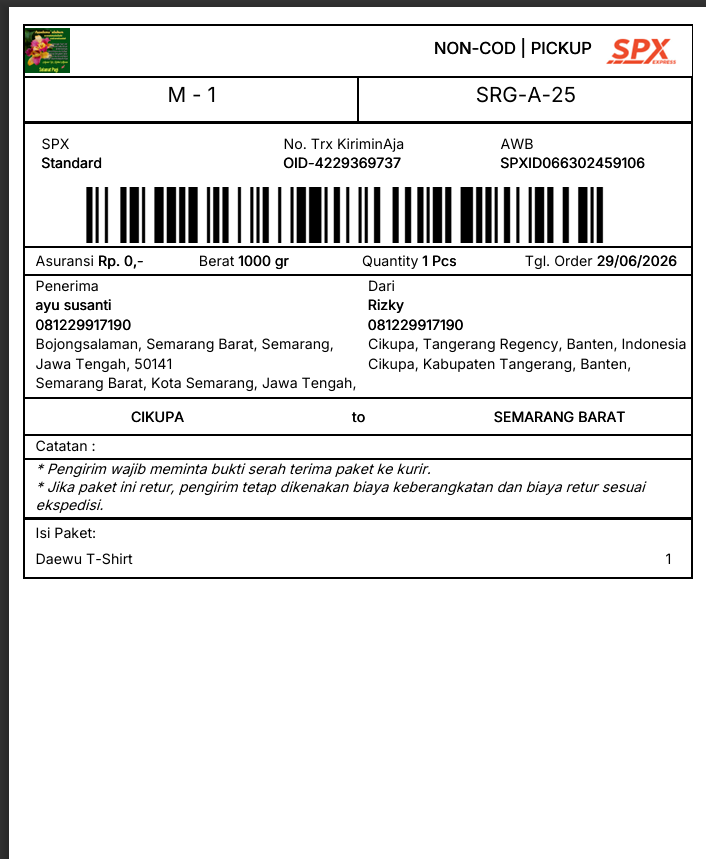
How to obtain that information? We recommend you to our support team to get the information of the sorting code for your shipment. You can contact us via email at tech@kiriminaja.com or your direct PIC that we already provided
Example